Friday, February 19, 2010

Scarab Club 2/18/09

More sketches from another night at the Scarab Club! Wasn't really feeling it tonight and ended up leaving early. Don't know what was up, but whatever. Sketches turned out ok. Still need a lot of work!

The last image was done last night right before I went to bed. It was drawn from a book about Florence, my favorite city on earth.
g


Friday, February 5, 2010

Scarab Number 6: Self-portrait #2


Scarab Number 6
Self-portrait #2

Sketch from a session at the Scarab Club.
25 min. pose. That's my reflection in the mirror!

Friday, January 22, 2010

Scarab Club 1/21/09

Here are some more sketches done last night at the Scarab Club. I really enjoyed this model. I would much rather draw old joints and wrinkled skin than that smooth skin any day!

These were all quick poses anywhere from 10-20 minutes.


Monday, January 18, 2010

Scarab Club

I recently started to go back to the Scarab Club for some life drawing sessions. It can't hurt, right? I feel the need to always become a better draftsmen and I feel that drawing from a model is always the best way to do this. Sometimes, we pick up bad habits along the way, while we draw. Drawing from a model is a great way to clear that up.

Here is a drawing I did last saturday morning. It's very rusty, but I'm hoping to knock off the cobwebs and get them feeling fresh again, real soon.
g


Thursday, January 14, 2010

Let the Sketches Roll!

Initially, when I started the blog, my intentions were to only post finished art, or at least stuff that was close to finished. However, in an effort to keep the blog feeling fresh (and to help myself feel like I'm a productive person) I have decided to start posting more sketches and unfinished work. That's cool, right? Besides, if you want to see only finished work, you could always download my portfolio by clicking that button over there on the right side of the page. I hope that's cool with YOU!

Here are some sketches I did last night. They are head sketches from that book about sketching all those heads.

g


Wednesday, January 13, 2010

It's Thor Day!

I'm not sure if it's because of all of the Thor movie news lately, but it seems as if everyone has been throwing up Thor sketches on Twitter the last two days. I had an hour or so to spare so I thought I'd throw my hat into the ring and give it a try. Sorry, no inks here. Can't do it. Just digi-pencils for me!

Hope you like it.
g

Tuesday, December 22, 2009

Merry Christmas!


Found this old Christmas card laying around...

Sunday, November 22, 2009

First Aid pt. 2

Had to see how First Aid would look with the new viewer, so I went ahead and converted it. I think this is a much better way to view the pitches. Any thoughts?
g

PS_Oh yeah! Be sure to see it in full screen view! Looks so much cooler!

Friday, November 20, 2009

Fugue Viewer

Just trying out a new way to share the comics. You've GOT to see it in FULL SCREEN MODE!!!! Woohoo!

Thursday, November 12, 2009

Holy Crap! I was a winner for once!


Hey guys,
Recently, Comic Geek Speak had a cool contest in conjunction with artist Freddie Williams II. I was one of 4 winners for the contest! Unfortunately, I didn't win the Grand Prize, which was an in depth portfolio review/critique by Freddie, but it was still a super fun and cool contest and am so glad I got to be a part of it. By being one of the winners, I did win a copy of Freddie's book and also had a little interview on the podcast.

If anyone is interested, you can here the interview right HERE. I sound like I am from Fargo or something:) Check it out!

Anyways, below is the piece that got me into the winner's circle.

Guy


Sunday, November 8, 2009

First Aid

Here's another recent pitch done with the very talented Sam Rugg. It's called First Aid. The concept is this: Every day, all over the world, people in first aid classes try to bring training dummies to life. First Aid looks at what happens when someone finally does it.

First Aid was another super fun pitch to work on. Sam is such a talented writer; so full of imagination. Look forward to big things from him! Pencils, inks, colors and letters by moi!

I hope you enjoy!
g


All art © Guy Allen and Sam Rugg

FUGUE

Hey everybody!
In trying to update the blog in proper fashion, here is some more newer stuff!

The following is a recent pitch I did in conjunction with super-talented scribe Elton Pruitt. It's called FUGUE and has been describes as Enemy of the State meets The Package in a “ripped from the headlines” story of a covert U.S. power play in the Middle East. It was a really fun project to work on and taught me a lot about my own working process. All art done by me. Letters by Jason Hanley.

I hope you like it!

Guy


All art © Guy Allen and Elton Pruitt

Character Concepts

Here is a character concept for a project with Australian writer Sam Rugg. We actually have a bunch of characters designed already, but I thought I'd share one with you all.
g


All art © Guy Allen and Sam Rugg

Saturday, October 24, 2009

CGS Batman


This was done for that Comic Geek Speak digital art contest. Finished just in the nick o' time!

This was my first time inking with the intention of spotting blacks. Crazy huh? Yeah, so it turned out kinda jacked up, but whatevs

Tuesday, September 1, 2009

Page Process

I'm gonna start this off just like every other blog I read and say that it's been a long time since the last post. I know. I've been mega-busy. I'm married now. I'm a much wiser man than the guy in my last post. Been half way around the world. Got tons of stuff in the works that should be surfacing pretty soon, but that's another post. So onto the task at hand...

Someone requested me to do this. I feel like I am still learning all the time and am by no means an authority on anything, but here it goes: my process for quick coloring in comic books. I hope it can shed a little insight on someone else.

Step 1:
To begin, I loosely sketch out a thumbnail at about 2 or 3 inches in height which I use for the page layout. Here I include notes for myself as to what I might want to change, colors I have in mind, etc. Once it's done, I blow it up to full page size and use it as an underlay; often moving things around through out the process. As you can see, I ended up moving around the three panels at the bottom into a more dynamic arrangement.


Step 2:
I pretty much go right into finished lines from my thumbnail. This is probably a horrible idea, but it's just how I work. I will do a more detailed underlay though, if I have a crazy perspective shot or a close up on faces or hands... anything really difficult.


Step 3:
Here I start flatting out the piece. This consists of basically coloring in the lines. I isolate forms/ objects of importance where I don't want the color going into an object next to it. For instance, the girl in the second frame is all blue on it's own layer. The coffee table underneath is a peach color on the layer below her. Basically I am separating objects by using color. In the image below, I have 4 different layers that I am isolating with; each layer holding a different color. Then I hit the "Preserve Transparency" button and now I can't color outside of those color fields.


The rest is pretty basic rendering techniques really. Unfortunately, I don't do tonal underlays like the good painters do. I only do that if I am actually painting with brushes. Here I will go straight into color.

Step 4:
Now I start laying in basic tones of how I want the piece to feel and start setting the mood with color. I am trying to establishing the local color for every item in the image. I am making the important items in the frame stand out by their colors. Pushing and pulling things until a hierarchy is formed by the colors. Remember this needs to read quickly. The viewer needs to see first what you want them to see first. One way to accomplish that is through color choices.


Step 5:
For the girl, I begin by establishing her main flesh tone. Once that's in, I start in on either the darks or the lights, depends on the mood. If I start in on the darks first, I will start with her main value and then go a little bit darker in all of the areas I want dark. Then I go a bit darker the farther I go out, in order to fully express the volume. Then darker and so on, until I hit the darkest value that I want for her shadows to be. Then I do the opposite for the lights. It's all about light source, intensity, value and temperatures.


Step 6;
Once the flesh is done, I start on the dress and do the exact same thing. Now I am also making sure that these colors all look like they go together and blend.


Step 7:
Step back. Change some things. Notice I made a color shift in the wall at this stage. Something just wasn't feeling right to me overall so I had to change it. Add the highlights only on the important things. Put the icing on the cake. Done.


Again, this isn't the best way to do it; it's just the way I am working at the moment. I hope it helps!
g


PS_My equipment is a 2.16 GHz Intel Core 2 Duo iMac running Mac OS X v. 10.5.8 (Gonna get Snow Leopard in a couple days) Work in Corel Painter 9.5 and PS3. I've found both programs to be better at certain tasks than the other. This piece was done entirely in Painter. I use this tablet.

Thursday, July 9, 2009

It's Almost Time...

Hi everyone. It's been a whirlwind time for me lately, both personally and professionally. I haven't been able to post in a long time due to all of the action going on over here. I'm all set to get married this weekend and then we are off on an amazing European honeymoon for 16 days. I can't wait! All of our families are starting to arrive in town and so the pressure is really on now. So far everything has gone off perfectly. Gonna try my best to follow everyone's advice and just chill out and enjoy it...

On the comics front, there are some interesting developments happening as of late. Wrapping up one project right now and have a few more on the table that sound very enticing. Have been approached by and met several really great people in the comics community recently. Trying to find my spot within the industry is hard work and a lot of sacrifice, but it has been a pure joy.

ok, I gotta go! Thanks to everyone and I'll see you all real soon. I already can't wait to start working again.
g

Wednesday, May 20, 2009

Tarzan

Produced for the PUMMEL Competition on PencilJack. The topic was Tarzan.

Monday, May 18, 2009

The Flashes!

This is my Flash piece for the PencilJack Grand Championships for May. It took me all day to do, but I finally knocked it out.

Monday, May 11, 2009

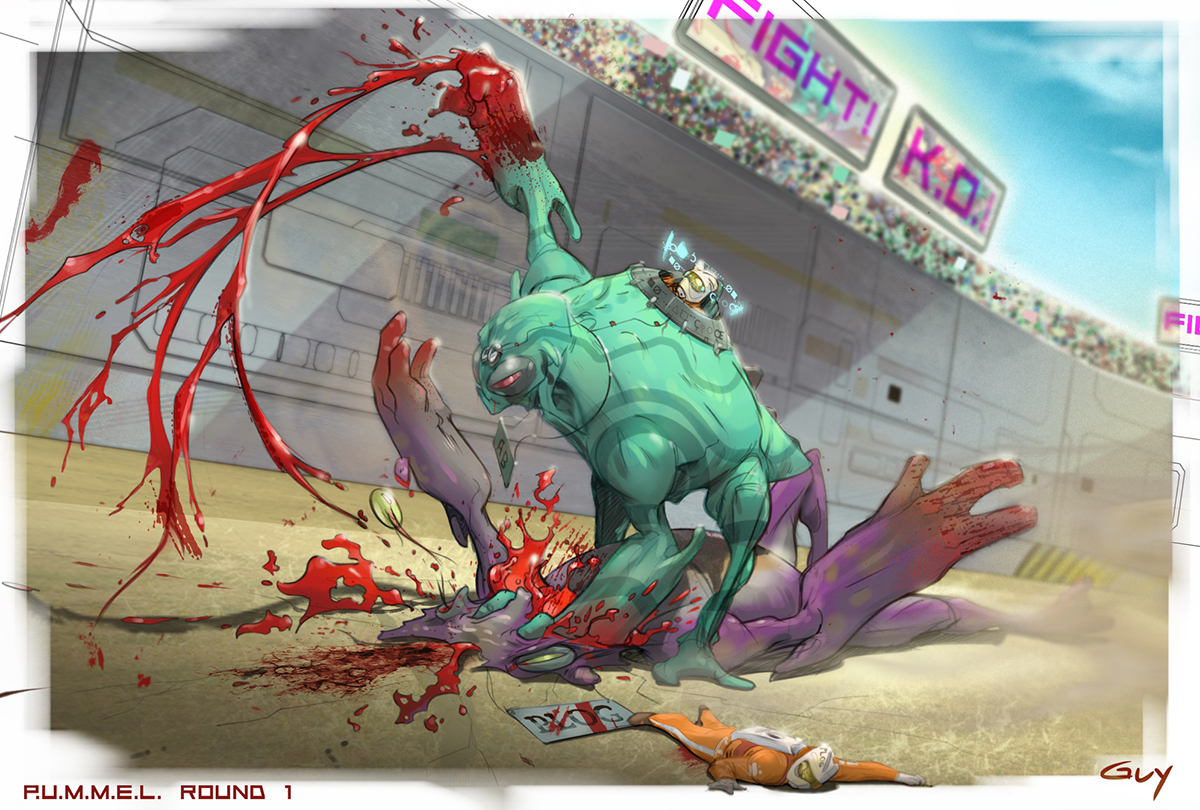
P.U.M.M.E.L. Tournament Round 1

This was done for PencilJacks's P.U.M.M.E.L. Tournament. In the first round my opponent got to pick the topic. He chose "Mounted Cobat." This is my submission. Didn't really have enough time to work on it, due to other obligations, but I thought it turned out pretty good for what I had to work with. Hope it goes well! :)